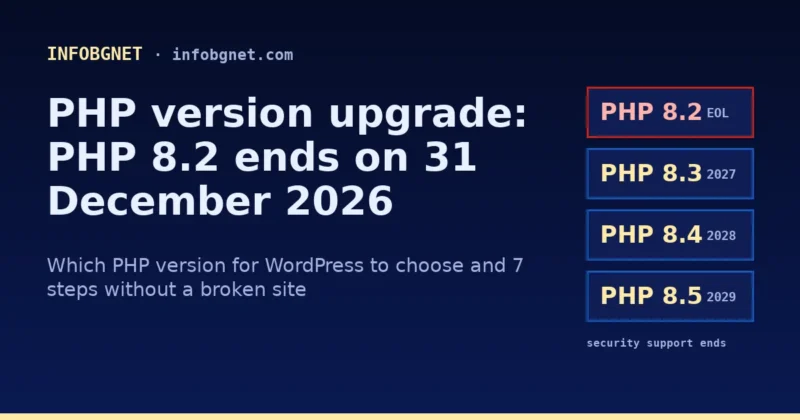
A PHP version upgrade means switching the PHP version your server uses to run your website, and this winter it is no longer optional: PHP 8.2 stops receiving security fixes on 31 December 2026. If your WordPress site still runs on PHP 8.2 or older, plan the move to PHP 8.3, 8.4 or 8.5 now, after testing on a copy of the site.
Contents
- What is a PHP version upgrade and why it matters now
- PHP 8.2 end of life on 31 December 2026: supported versions
- Which PHP version for WordPress should you choose?
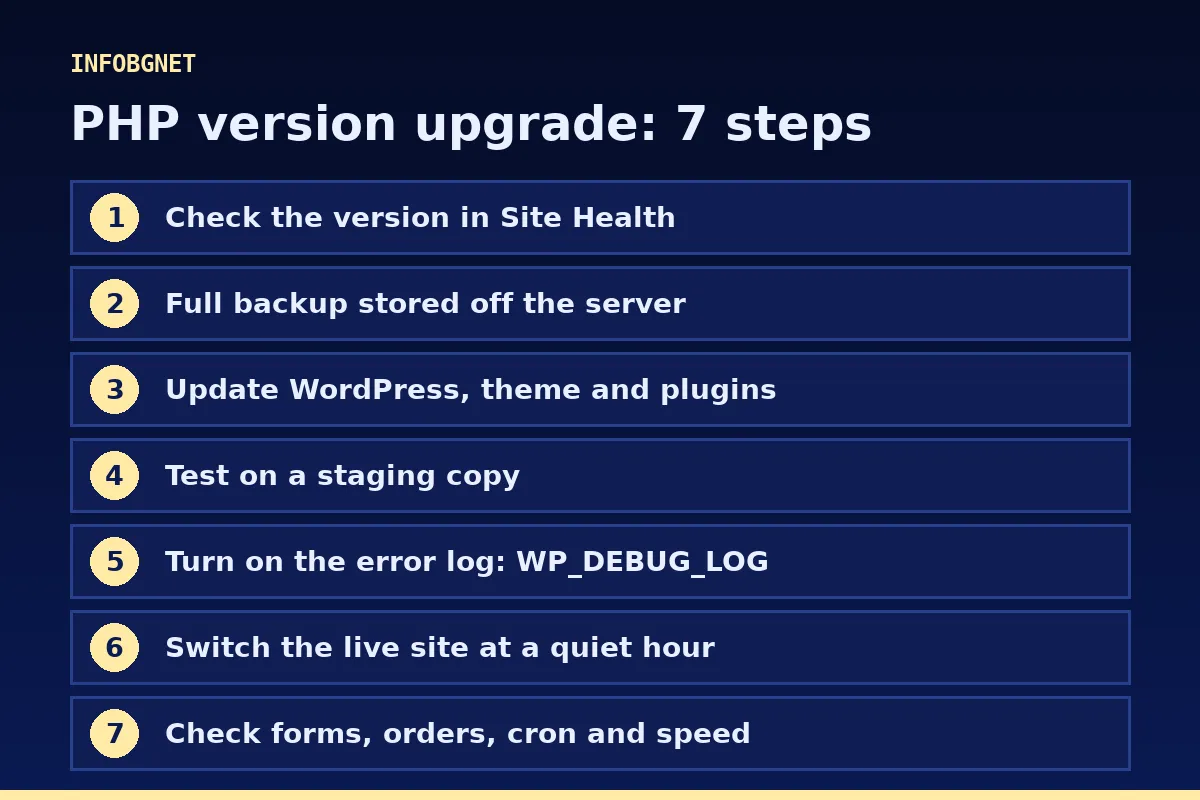
- PHP version upgrade in 7 steps
- PHP version upgrade checklist
- Our experience: what practice has shown since 2012
- Common problems with a PHP version upgrade
- What a PHP version upgrade costs at INFOBGNET
- Frequently asked questions
- Need help?
It has been a busy week for anyone who maintains websites. On 19 November 2026 PHP 8.6 was released, and on the same day the PHP team shipped security releases for every supported branch: 8.5.13, 8.4.28, 8.3.37 and 8.2.36, according to the official PHP news archive. Below I explain what the PHP 8.2 end of life means for your site, which PHP version for WordPress to choose and how to do a PHP version upgrade without breaking pages.
What is a PHP version upgrade and why it matters now
PHP is the language that runs WordPress, WooCommerce and almost every plugin. Every page view, every order and every form submission goes through PHP on the server. There are two kinds of PHP updates:
- Patch updates within a branch, for example from 8.3.36 to 8.3.37. These are security and bug fixes with no language changes. They happen often and rarely break anything.
- Moving to a new branch, for example from 8.2 to 8.3 or 8.4. This brings language changes, deprecated functions and new warnings. This is the PHP version upgrade that needs testing.
Each PHP branch gets two years of active support and two more years of security-only fixes, after which it is unsupported. This is documented on the PHP Supported Versions page. For PHP 8.2 those four years end on 31 December 2026. Any vulnerability found after that date will not be fixed in 8.2, and the PHP2Shell case in October showed how quickly attacks follow a disclosure. I covered the details in the article about the PHP2Shell vulnerability.
PHP 8.2 end of life on 31 December 2026: supported versions
Here is the current status as of 20 November 2026, based on PHP’s own data:
| PHP version | Released | Security fixes until | What to do |
|---|---|---|---|
| PHP 8.1 and older | up to November 2021 | Unsupported | Urgent PHP version upgrade |
| PHP 8.2 | 8 December 2022 | 31 December 2026 | Move to 8.3, 8.4 or 8.5 before year end |
| PHP 8.3 | 23 November 2023 | 31 December 2027 | Safe, the recommended minimum for WordPress |
| PHP 8.4 | 21 November 2024 | 31 December 2028 | Good choice for most sites |
| PHP 8.5 | 20 November 2025 | 31 December 2029 | Good choice if your plugins support it |
| PHP 8.6 | 19 November 2026 | 31 December 2030 | Testing only for now |
One important point: a PHP version upgrade is not done from inside WordPress. The PHP version is changed in your hosting panel (cPanel, CyberPanel, Plesk) or by the server administrator. Updating WordPress, the theme and plugins does not change the PHP version.
Which PHP version for WordPress should you choose?
The official WordPress Requirements page recommends PHP 8.3 or greater. According to the WordPress PHP compatibility table, WordPress 6.9, 7.0 and 7.1 are compatible with PHP 7.4 through 8.5. In May 2026 the WordPress core team retired the “beta support” label that PHP 8.4 and 8.5 had carried until then (WordPress Core announcement).
PHP 8.6 is not yet listed in the WordPress table, so keep it off production sites for now. Our practical recommendation for the PHP version for WordPress:
- PHP 8.3 if you rely on many old or premium plugins that are rarely updated. Supported until the end of 2027.
- PHP 8.4 for most business websites and online stores. Supported until the end of 2028.
- PHP 8.5 if your theme and plugins explicitly support it. Supported until the end of 2029.
What matters is not which version is newest, but whether your theme and plugins work with it. That is why every PHP version upgrade starts with a test.
PHP version upgrade in 7 steps
- Check your current version. In WordPress open Tools → Site Health → Info → Server. That is the PHP version your site actually runs on.
- Take a full backup. Files and database, stored off the server. No backup, no PHP version upgrade.
- Update WordPress, the theme and plugins. Their latest releases usually already include fixes for newer PHP versions. Remove plugins you do not use.
- Test on a staging copy. Switch the PHP version on the copy only and walk through the key pages: home, services, contact, cart, checkout and the admin area.
- Turn on the error log. Temporarily set
WP_DEBUG_LOGinwp-config.phpand reviewwp-content/debug.logfor “deprecated” notices and fatal errors. - Switch the live site. Pick a low-traffic hour. If something goes wrong, switching back in the hosting panel takes minutes.
- Check again after the PHP version upgrade. Forms, orders, emails, cron jobs and speed. Clear the cache and watch the logs for a few days.
A practical tip for step 6: before switching, write down the exact current version and where it is selected in your hosting panel. If something stops working after the PHP version upgrade, rolling back should take minutes, not a search through menus. On high-traffic sites we make the switch early in the morning, when visitors are fewest, and watch the logs closely during the first hour.
WordPress collects its official advice on the Update PHP page, and the language changes are described in the PHP 8.4 migration guide.
PHP version upgrade checklist
| When | What to check | Done? |
|---|---|---|
| Before | Current PHP version in Site Health | ☐ |
| Before | Backup of files and database stored off the server | ☐ |
| Before | WordPress, theme and plugins updated; unused plugins removed | ☐ |
| Before | Each premium plugin supports the new PHP version (vendor changelog) | ☐ |
| During | Staging copy tested on the new version | ☐ |
| During | Error log free of fatal errors | ☐ |
| After | Forms, orders, payments and emails work | ☐ |
| After | Cron jobs and command-line PHP use the same version | ☐ |
| After | Speed has not dropped, cache cleared | ☐ |
Our experience: what practice has shown since 2012
I have been building and maintaining WordPress websites since 2012 and have been through every major switch, from PHP 5 to 7 and from 7.4 to 8. Here is what repeats in almost every PHP version upgrade:
- WordPress core is rarely the problem. The error nearly always comes from an old plugin, an old theme or custom code written years ago and never updated.
- Several versions on one server. On our server we run several PHP versions side by side, so each site moves on its own when it is ready, not all at once.
- Two PHP versions in one site. A site can run on PHP 8.3 while its command-line cron jobs run on a different version. That is why we check both.
- Today’s warnings are tomorrow’s errors. “Deprecated” notices do not stop the site now, but on the next PHP version upgrade the same code may cause a fatal error.
Common problems with a PHP version upgrade
- White screen or “critical error”. Cause: a plugin or theme with code that is incompatible with the new version. Fix: switch back in the hosting panel, find the culprit in
debug.logand update or replace it. - The site works but the admin area does not. Cause: a plugin that loads code only in the dashboard. Fix: temporarily disable it by renaming its folder via FTP or the file manager.
- New version selected, but Site Health shows the old one. Cause: the version was changed for a different domain, or old PHP processes were not restarted. Fix: check the setting for the exact domain and restart PHP.
- Your host does not offer a newer version. Cause: outdated or unmaintained hosting. Fix: move the site to a provider that offers at least PHP 8.3 and updates regularly.
- A premium plugin with no updates. Cause: an expired licence or an abandoned product. Fix: renew the licence or replace the plugin before 31 December 2026.
What a PHP version upgrade costs at INFOBGNET
For clients on website maintenance, the PHP version upgrade is included in the monthly price of €70 per month: we track the dates, test on a copy, switch the version and check the site afterwards. If you do not have maintenance yet, start with a free SEO audit, which also checks your PHP version. For online stores, see the article on online store maintenance.
Frequently asked questions
What happens to my site after 31 December 2026 if it stays on PHP 8.2?
The site will keep working, but PHP 8.2 will no longer receive security fixes. Any new vulnerability in PHP 8.2 will stay open, so a PHP version upgrade to 8.3 or newer should happen before that date.
What is the best PHP version for WordPress in 2026?
WordPress recommends PHP 8.3 or greater. For most sites PHP 8.4 is a good balance between compatibility and long support, until the end of 2028. PHP 8.6 is for testing only for now.
Can I do a PHP version upgrade myself?
Yes, if your hosting panel lets you choose the PHP version and you have a backup. The risk lies in untested plugins, so always test on a copy of the site first.
Will my site be faster after a PHP version upgrade?
Often yes, especially when moving from PHP 7.x to 8.x. Between 8.3, 8.4 and 8.5 the difference for a typical site is usually small. The main reason to upgrade is security, not speed.
How much does a PHP version upgrade cost at INFOBGNET?
It is included in website maintenance at €70 per month, together with updates, backups and security monitoring.
Need help?
If you do not know which PHP version your site runs on, or you are worried something will break, get in touch. We will check the version and your plugins and tell you exactly what needs to be done before the end of the year.
PHP2Shell: the October 2026 PHP vulnerability and why website maintenance matters
PHP2Shell is a pair of critical PHP vulnerabilities that let attackers run code on web servers without a password – the fix shipped on…
Read more →
Cookie Consent Banner Checklist: What EU Regulators Expect in 2026
Cookie consent banner checklist for EU websites: what regulators expect, common mistakes and a 7-step audit to run before your Q4 campaigns.
Read more →
Black Friday Website Preparation: A 2026 Checklist for Speed, SEO and EU Pricing Rules
Black Friday website preparation for 2026: a practical checklist for speed, security, SEO and EU 30-day lowest price rules before 27 November.
Read more →Want an SEO audit of your website?
A free SEO audit, no commitment. Just a concrete look at what can be improved.