A compliant cookie consent banner blocks non-essential cookies until the visitor chooses, shows “Reject” as clearly as “Accept” and lets people change their mind at any time. I set up and check consent banners on client websites as part of my maintenance work, and below is what EU regulators expect plus a 7-step audit you can run yourself.
Contents
- Why Your Cookie Consent Banner Matters in Late 2026
- What European Regulators Expect From a Cookie Consent Banner
- Compliant vs Non-Compliant Cookie Consent Banner
- Common Mistakes Website Owners Make
- How to Audit Your Cookie Consent Banner in 7 Steps
- Consent, SEO and User Experience
- Cookie Consent Banner FAQ
- Final Thoughts
A cookie consent banner is often the first thing a visitor sees on an EU website, and it has been the subject of many complaints to data protection authorities. With the busiest online shopping season of the year approaching, mid-October is a practical moment to check whether your banner actually asks for consent, or whether it just looks like it does. This guide walks through what European regulators expect, the most common mistakes and a simple audit you can run on your own site.
Why Your Cookie Consent Banner Matters in Late 2026
Cookies and similar trackers are covered by two sets of rules in the EU. The ePrivacy Directive requires prior consent before non-essential cookies are stored on a device, and the GDPR defines what valid consent means: freely given, specific, informed and unambiguous. The European Data Protection Board explains these criteria in its Guidelines 05/2020 on consent.
In practice, this means analytics, advertising and many marketing tools should not fire until the visitor has made a clear choice. If your banner loads tracking scripts first and asks questions later, the design of the banner does not matter, because the consent was never collected in time.
There is also a business reason to care. A confusing banner frustrates users, and frustrated users leave. Before Q4 campaigns bring more traffic to your pages, a clean and honest consent flow helps both trust and conversions.
What European Regulators Expect From a Cookie Consent Banner
The European Data Protection Board brought national authorities together in a dedicated taskforce that reviewed complaints about cookie banners. Its report on the work of the Cookie Banner Taskforce summarises the common positions the authorities reached. The key points can be grouped into a few practical rules.
Reject Must Be as Easy as Accept
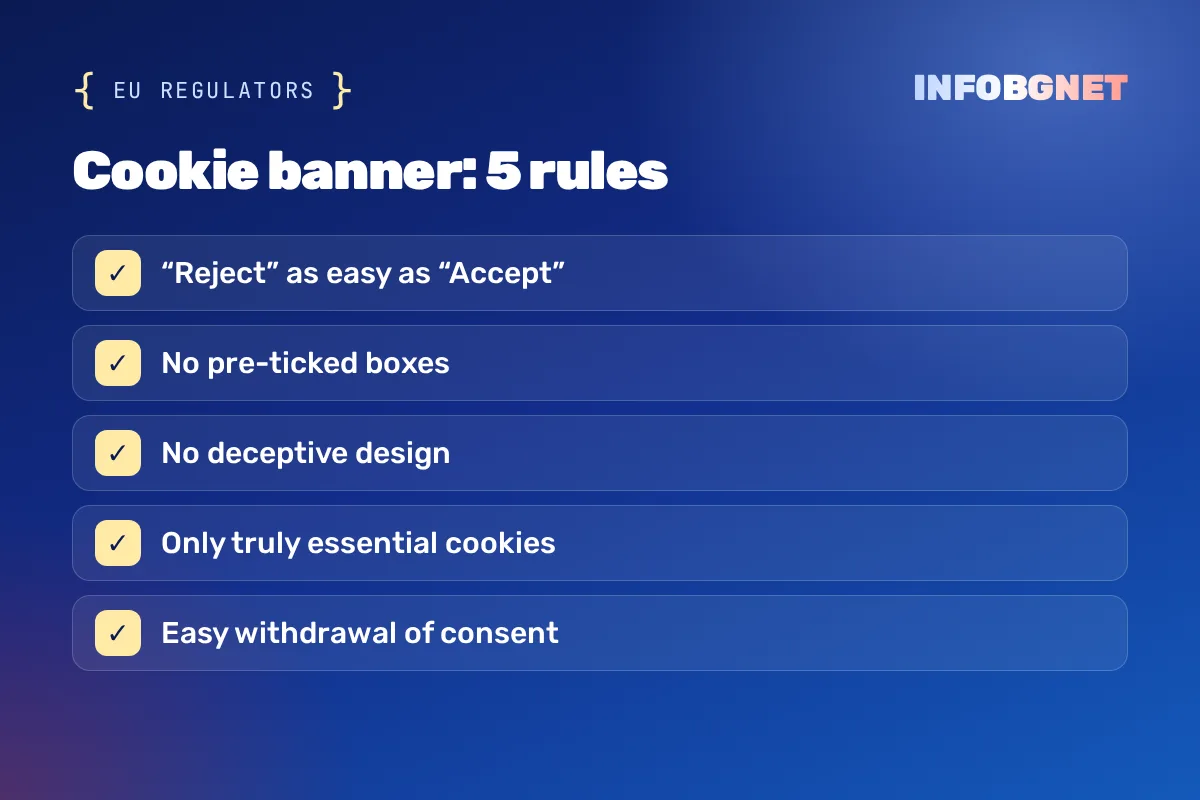
Most authorities in the taskforce agreed that a banner which offers “Accept all” on the first layer but hides the refusal option deeper in the settings does not meet the standard. If accepting takes one click, refusing should not take five.
No Pre-Ticked Boxes
Consent requires an active choice. Checkboxes or toggles that are already switched on for non-essential categories do not count as valid consent.
No Deceptive Design
The authorities also looked at design choices that steer people towards accepting, such as a refusal option shown as a small text link or with very low contrast. These cases are judged individually, but the direction is clear: the design should not push the user towards one answer.
Essential Cookies Must Really Be Essential
Some sites label analytics or advertising cookies as “strictly necessary” to skip the consent step. The taskforce noted that such classification has to be checked, and that legitimate interest is not a substitute for consent when it comes to storing or reading non-essential cookies.
Withdrawing Consent Should Stay Simple
Visitors should be able to change their mind easily at any time, for example through a small, always visible icon or a clear link in the footer that reopens the cookie consent banner settings.
Compliant vs Non-Compliant Cookie Consent Banner
| Compliant | Not compliant |
|---|---|
| “Accept” and “Reject” on the first layer, equally visible | Only “Accept” or “OK”, refusal hidden in the settings |
| Non-essential categories switched off by default | Pre-ticked analytics or marketing toggles |
| Tracking scripts load only after consent | Analytics and pixels fire on page load |
| Settings can be reopened from every page | No way to change the choice later |
| Cookie policy lists the tools actually in use | Outdated policy copied from a template |
Common Mistakes Website Owners Make
On many WordPress and small business websites, the same issues tend to come up:
- Google Analytics, Meta Pixel or other tags load before the visitor clicks anything.
- The banner has only an “OK” or “Accept” button and no real choice.
- The cookie policy is outdated and does not list the tools actually installed.
- A plugin was installed years ago and never configured beyond the default settings.
- Consent choices are not stored, so returning visitors are asked again on every page.
- Third-party embeds such as videos and maps set cookies without any consent check.
Many of these problems are invisible to the site owner, because everything looks fine on the surface. They usually appear only when someone opens the browser developer tools or runs a proper scan.
How to Audit Your Cookie Consent Banner in 7 Steps
You do not need an expensive tool to start. A careful manual check already reveals most issues.
- Open your site in a private window. This shows the experience of a first-time visitor with no stored choices.
- Check the browser storage before clicking. In the developer tools, look at the cookies and network requests. Only strictly necessary cookies should be present at this point.
- Compare the buttons. Make sure “Accept” and “Reject” sit on the same layer and are equally visible.
- Click “Reject” and reload. Confirm that no analytics or advertising cookies appear afterwards.
- Test the settings layer. Each category should be off by default and should be explained in plain language.
- Find the withdrawal option. Check that visitors can reopen the settings from any page.
- Review the cookie policy. Make sure it matches the tools that are really running on the website today.
If you already run regular technical reviews, add these steps to the checklist. They fit naturally next to the checks described in our guide on what an SEO audit includes.
Cookie Consent Banner Setup on WordPress
On WordPress, consent is usually handled by a plugin. Choose one that blocks scripts until consent is given, rather than one that only shows a notice. After installation, map each plugin and tracking code to the right category and test again with the steps above. If you are optimising the rest of your site too, our article on SEO WordPress optimization covers the technical basics.
Consent, SEO and User Experience
A well-built banner does not have to hurt performance or rankings. Keep it lightweight, avoid layouts that cover the whole screen on mobile and make sure it does not cause large layout shifts when it appears. Clear wording and a respectful design also support the trust signals that matter for both visitors and search engines.
Consent is only one part of a compliant website. Accessibility rules now apply to many EU businesses as well, which we explain in our article on European Accessibility Act compliance. Good privacy habits also connect to general security, covered in how to stay safe online.
If you would rather have someone check it for you, the banner and the cookie policy are part of our website maintenance, and a free SEO audit includes a quick look at what loads before consent.
Cookie Consent Banner FAQ
Do I need a cookie consent banner if I only use Google Analytics?
Yes, in most cases. Analytics cookies are generally not considered strictly necessary, so they need prior consent from visitors in the EU.
Is an “Accept” button with a close icon enough?
Usually not. Visitors should have a clear option to refuse that is as easy to use as the option to accept.
Can I pre-select analytics or marketing cookies?
No. Pre-ticked boxes do not count as valid consent, so all non-essential categories should be switched off by default.
Which cookies can load without consent?
Only cookies that are strictly necessary for the service the user requested, such as session, security or shopping cart cookies.
How often should I review my cookie consent banner?
Review it whenever you add a new plugin, tag or embed, and run a full check at least once a year.
Final Thoughts
A cookie consent banner is a small element with a big impact on trust and compliance. Spend an hour this month testing it as a new visitor would, fix what does not work and keep your cookie policy in step with your real setup. Your visitors, and your future self, will thank you.

Black Friday Website Preparation: A 2026 Checklist for Speed, SEO and EU Pricing Rules
Black Friday website preparation for 2026: a practical checklist for speed, security, SEO and EU 30-day lowest price rules before 27 November.
Read more →
WordPress (WooCommerce) online store maintenance: what it includes and what it costs
What WooCommerce online store maintenance includes: updates, backups, security, speed, a checklist and the price.
Read more →
European Accessibility Act Compliance 2026: What EU Website Owners Need to Know
European Accessibility Act compliance: the EAA deadline has already passed — 2026 is the first full year of active EU enforcement. See what WCAG…
Read more →Want an SEO audit of your website?
A free SEO audit, no commitment. Just a concrete look at what can be improved.