
Black Friday website preparation means testing speed, checkout and security, refreshing one permanent landing page for SEO and showing EU-compliant prior prices – ideally five or more weeks before 27 November 2026. I have prepared WordPress and WooCommerce shops for peak sales since 2012, and below is the order I work in when the calendar is tight.
Contents
- Why Black Friday Website Preparation Should Start Now
- Black Friday Website Preparation Timeline
- Technical Black Friday Website Preparation Checklist
- SEO Steps for Black Friday Website Preparation
- EU Pricing Rules for Black Friday Discounts
- After the Sale: Measure and Keep the Gains
- Need Help Before the Sale?
- Black Friday Website Preparation FAQ
Black Friday 2026 falls on 27 November, with Cyber Monday following on 30 November. That leaves about five weeks from mid-October – still enough time for proper Black Friday website preparation if you start now. Search engines need time to crawl and rank new pages, servers need testing under load, and EU pricing rules need to be built into your promotions before the first discount goes live.
This guide walks through the technical, SEO and legal steps worth completing before the busiest shopping weekend of the year, in the order that makes the most sense when the calendar is tight.
Why Black Friday Website Preparation Should Start Now
Most problems that cost sales during a peak weekend are not created on the day itself. They are slow pages that were never tested with real traffic, landing pages published too late to be indexed, or checkout errors nobody noticed because the shop was quiet in September.
Starting early gives you three advantages:
- Indexing time. New or refreshed category and landing pages need weeks, not days, to be discovered and settle in search results.
- Room for fixes. A technical audit almost always uncovers issues, and some of them need a developer.
- Calm testing. You can change themes, plugins or hosting settings while traffic is still normal, not in the middle of a sale.
If you sell online and want a broader picture of how e-commerce has evolved, our article on everything about online stores, shopping, sales and bargains is a good starting point.
Black Friday Website Preparation Timeline
| When | What to do |
|---|---|
| 5–6 weeks before | Technical and SEO audit, hosting capacity check, permanent landing page updated and live |
| 3–4 weeks before | Load and speed tests, price history check for the 30-day rule, internal links to the sale page |
| 1–2 weeks before | Freeze non-essential updates, full backup, test orders with every payment method |
| Sale week | Monitor uptime, speed, stock levels and checkout errors every day |
| After the sale | Compare traffic, conversion rate and average order value; note what to fix next year |
Technical Black Friday Website Preparation Checklist
The technical layer is where a peak-season campaign either holds up or falls over. Focus on the areas below before you touch any creative work.
Speed and Hosting Capacity
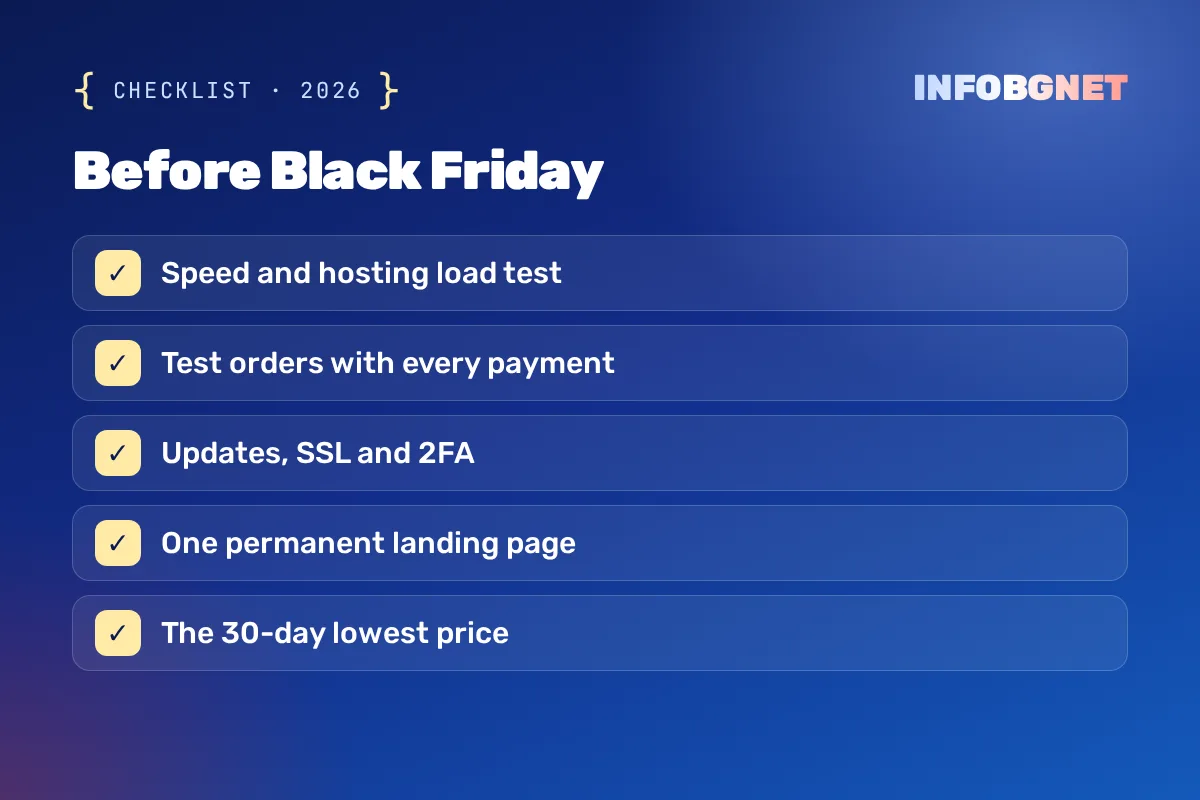
Traffic during a sale weekend can be several times higher than on an ordinary day. Ask your hosting provider what your plan can realistically handle and whether resources can be scaled temporarily. Then reduce the load on the server itself:
- Enable page caching and a content delivery network for static files.
- Compress and resize product images, and serve modern formats where possible.
- Remove plugins and scripts that are no longer used.
- Test key pages on mobile, where most promotional traffic tends to arrive – Google’s Core Web Vitals are a good yardstick.
Checkout and Payment Testing
Place real test orders with every payment method you offer, including discount codes, free-shipping thresholds and guest checkout. Check that confirmation emails arrive, that stock levels update correctly and that totals in € are calculated as expected after a discount is applied.
Security Before Peak Traffic
Busy shopping periods also attract fraud and phishing attempts. Update the CMS core, theme and plugins, make sure your SSL certificate is valid, and enable two-factor authentication for every admin account. Take a full backup before the campaign starts and keep a restore plan ready. For general habits that protect both you and your customers, see how to stay safe online.
Accessibility of Sale Pages
Countdown timers, pop-ups and banner sliders are common on promotional pages, and they are often the least accessible elements on a site. Make sure pop-ups can be closed with a keyboard, text on banners has sufficient contrast and important information is not shown only as an image. If you sell to consumers in the EU, these points also connect to the obligations described in our guide to European Accessibility Act compliance.
SEO Steps for Black Friday Website Preparation
Search visibility for seasonal queries is built in advance. A few focused SEO tasks done now can bring organic visitors who would otherwise go to competitors or to paid ads.
Use One Permanent Black Friday Landing Page
Instead of creating a new URL every year, keep a single evergreen page such as /black-friday/ and update its content each season. The page keeps the links and authority it has collected over time. Outside the campaign, it can show a short message about upcoming offers rather than being deleted.
Avoid Competing Pages
Several pages targeting the same seasonal phrase (a blog post, a category page and a separate offer page, for example) can end up competing against each other. Decide which URL should rank and point the others to it with internal links. Our article on SEO cannibalization explains how to spot and resolve this.
Run a Quick SEO Audit
Check for broken links, missing title tags, duplicate meta descriptions and pages accidentally blocked from indexing. A focused review now is much easier than troubleshooting during the sale. The process is described in detail in what does an SEO audit include. If your shop runs on WordPress, our guide to SEO WordPress optimization covers the platform-specific settings.
Strengthen Internal Linking
Link to your Black Friday page from the homepage, the main navigation or a visible banner, and from relevant category pages. This helps search engines understand that the page matters right now and helps visitors find the offers quickly. For wider tactics, read how to improve organic traffic with SEO techniques.
EU Pricing Rules for Black Friday Discounts
Black Friday website preparation is not only technical. In the European Union, the Price Indication Directive includes a specific rule (Article 6a, added by the Omnibus Directive (EU) 2019/2161) for announcing price reductions. According to the European Commission’s page on the Price Indication Directive, any announcement of a price reduction must show the prior price, meaning the lowest price the trader applied during a period of at least 30 days before the reduction.
In practice, this means:
- Your shop needs a record of price history for every product included in the sale.
- The “before” price shown next to a discount should be the lowest price from the previous 30 days, not a higher list price.
- Products whose price was raised shortly before the campaign should be checked carefully, because the reference price may be lower than you expect.
National rules can add details, so confirm the requirements in the countries where you sell. Many e-commerce platforms offer extensions that store price history and display the 30-day lowest price automatically, which is far safer than updating it by hand.
After the Sale: Measure and Keep the Gains
Once the weekend is over, compare traffic, conversion rate and average order value with the previous year. Note which pages loaded slowly, which products sold out and where visitors abandoned their carts. Keep the landing page live with updated content, and add the lessons learned to next year’s plan so that preparation starts even earlier.
Need Help Before the Sale?
If your shop runs on WordPress or WooCommerce, our online store maintenance covers updates, backups and monitoring through the busiest weeks of the year, and a free SEO audit will show which issues to fix first before Black Friday.
Black Friday Website Preparation FAQ
When should I start Black Friday website preparation?
Ideally in early October. This leaves time for technical fixes, load testing and for search engines to index new or updated landing pages before late November.
When is Black Friday in 2026?
Black Friday 2026 is on Friday, 27 November, and Cyber Monday follows on 30 November.
Should I create a new Black Friday page every year?
No. A single permanent URL that you update each season keeps the links and ranking signals it has built over previous years.
What price must I show next to a discount in the EU?
Under Article 6a of the Price Indication Directive, the prior price shown must be the lowest price you applied during at least the 30 days before the reduction.
How can I stop my site from crashing during the sale?
Check your hosting capacity with your provider, enable caching and a CDN, optimise images, remove unused plugins and test the checkout before the campaign starts.
WordPress (WooCommerce) online store maintenance: what it includes and what it costs
What WooCommerce online store maintenance includes: updates, backups, security, speed, a checklist and the price.
Read more →
European Accessibility Act Compliance 2026: What EU Website Owners Need to Know
European Accessibility Act compliance: the EAA deadline has already passed — 2026 is the first full year of active EU enforcement. See what WCAG…
Read more →
How do I monitor my competitors’ SEO performance?
Competitor SEO analysis means tracking which keywords, pages and links bring your rivals organic traffic – and finding the gaps you can win. Below…
Read more →Want an SEO audit of your website?
A free SEO audit, no commitment. Just a concrete look at what can be improved.